


TL;DR Summary: TikTok's official developer APIs are free to access but gated behind an app audit process before you can publish public content. Access tokens expire every 24 hours, the Content Posting API caps video publishing at 6 requests per minute per user token, and the TikTok Shop API received significant updates in 2025-2026 - including mandatory HTTPS enforcement and new versioned analytics endpoints. If you want to pull creator data across platforms with less overhead, Phyllo offers a consent-driven, unified API layer that handles TikTok and 10+ other platforms from a single integration.
- TikTok API integration in 2026 starts in sandbox mode, and posts from an unaudited app are forced to private visibility.
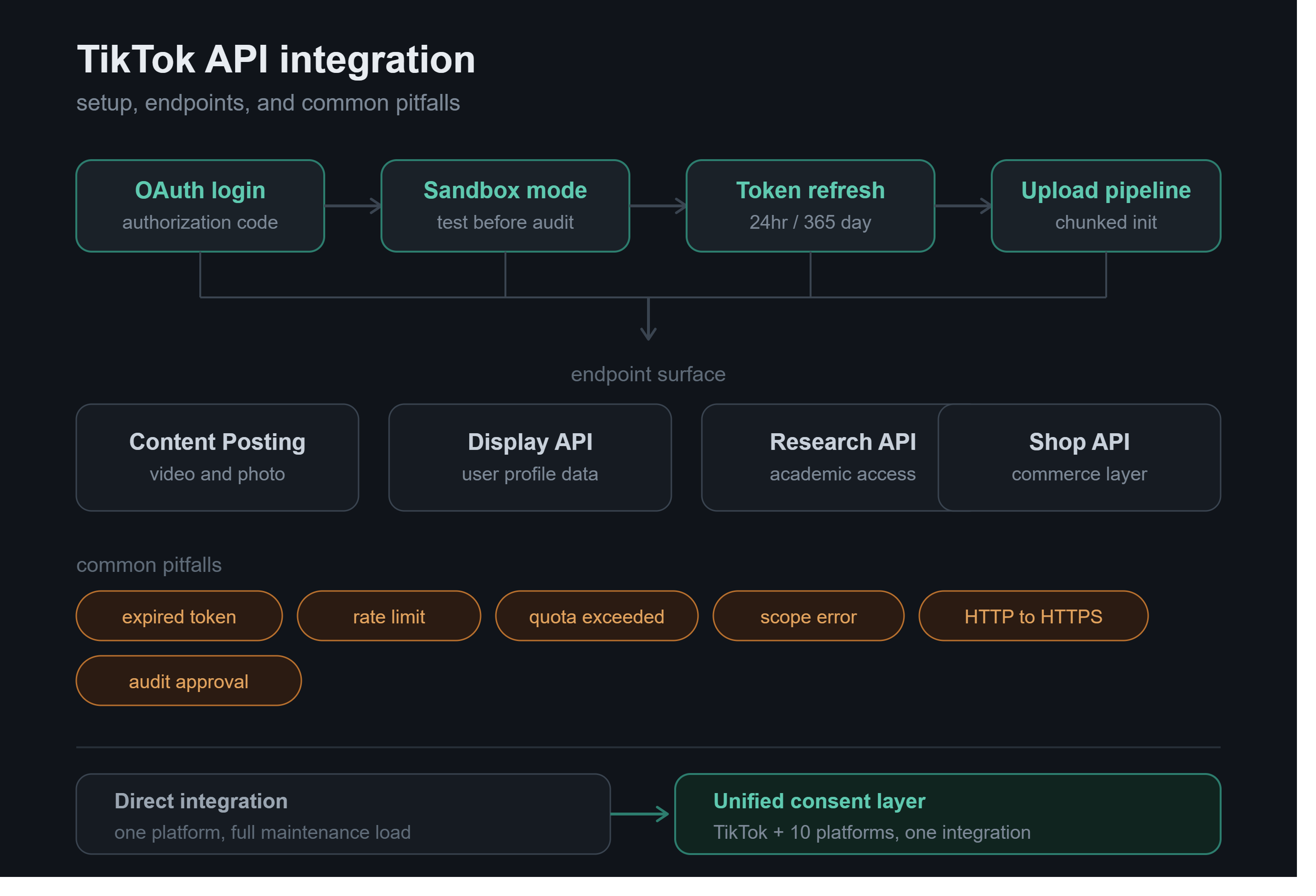
- Access tokens expire after 24 hours and refresh tokens last 365 days, so background refresh logic is mandatory.
- The Content Posting API caps upload initiation at 6 requests per minute, plus 25 posts per account daily.
- TikTok Shop's gateway went HTTPS only on June 17, 2026, and the Affiliate Trace Orders API retires August 15, 2026.
- A clean production audit clears in one to two weeks with a privacy policy URL and a scope-covering demo video.
What Changed in the TikTok API in 2025–2026?
If your TikTok integration was working smoothly a year ago, there is a reasonable chance it has already encountered at least one breaking change. The platform's developer surface has shifted meaningfully across four areas since mid-2025.
Photo support on the Content Posting API
The endpoint that previously accepted only MP4 video uploads now supports photo carousels as well. Teams building image-first content tools no longer need workarounds or unofficial endpoints to post photo content programmatically.
Sandbox mode as the standard pre-audit path
TikTok now treats sandbox mode as the default environment for all new apps. You can create up to five sandboxes per app, share each one with up to ten TikTok accounts, and test the entire upload and OAuth flow without submitting for review. The catch: any content published from an unaudited app is forced to private visibility, regardless of the privacy setting a user selected during the OAuth consent screen. This trips up a surprising number of developers who assume a "public" privacy setting during testing will hold in production.
Originality Policy enforcement tightened
Since September 15, 2025, TikTok has been more aggressively demoting content that carries another platform's visible watermark or that appears as a near-duplicate of an existing upload. Scheduling tools that recycle content from a shared library need to account for this at the pipeline level, not just at the content level.
TikTok Shop API - HTTPS enforcement
As of June 17, 2026, the TikTok Shop Open Platform gateway (open-api.tiktokglobalshop.com) accepts HTTPS connections only. Any integration still sending HTTP requests broke on that date. If you are maintaining a Shop integration, check your HTTP client configuration if you have not already.
Developer Portal Setup, Step by Step
Getting from zero to a working API call involves more steps than most developer portals require. Here is what the process looks like end to end.
Step 1 - Register at developers.tiktok.com
Create a developer account using a TikTok for Business login. If you do not already have one, you can register directly at the developer portal.
Step 2 - Create an app
From the developer portal dashboard, create a new app and select the product suite you need - Login Kit, Content Posting API, Research API, or others. Each product suite requires separate scope requests.
Step 3 - Configure scopes
Scopes define what data and actions your app can request on a user's behalf. Common scopes include video.upload, video.publish, user.info.basic, and user.info.profile. Request only the scopes your app actually needs - scope creep is a common audit rejection reason.
Step 4 - Enable sandbox mode
Before writing a single API call, enable sandbox mode. This gives you a testable environment where you can run the full OAuth and upload flow against real TikTok infrastructure without publishing content publicly.
Step 5 - Build and validate in a sandbox
Complete your integration: OAuth flow, token exchange, the content posting or data retrieval logic, and error handling. Test all requested scopes, because the production audit will require a demo video that covers every scope your app requests.
Step 6 - Submit for production audit
When your app is ready for real users, submit it for TikTok's app review. Required materials include a privacy policy URL, a working demo video of your complete OAuth and upload flow, a clear description of how user data is handled, and confirmation that your app complies with TikTok's developer guidelines. A clean, well-documented first-pass submission takes roughly one to two weeks to clear in 2026. Incomplete submissions or those missing demo coverage of specific scopes take significantly longer.
Key Endpoints: Content, User, Analytics, Shop
TikTok's API surface is divided across several product areas. Here is a quick orientation to the endpoints most teams will use.
Content Posting API (open.tiktokapis.com/v2/post/publish/)
The Content Posting API supports two publishing modes. In Direct Post mode, content goes live immediately (or at a scheduled time) as a public post. In Creator's Draft mode, the video is deposited in the creator's TikTok inbox as a draft for them to review before publishing. The upload flow itself is chunked - you initiate an upload with a POST to /v2/post/publish/video/init/, declare the video source type (file upload or URL pull), chunk count, total file size, and metadata (caption, privacy level, interaction settings). TikTok responds with an upload_url and a publish_id. The publish_id is your reference for tracking the entire post lifecycle.
Display API / User Info (/v2/user/info/)
The Display API provides access to basic and extended user profile data. Fields available include display name, avatar URL, follower count, and video list. Note that after the scope migration, user.info.basic returns fewer fields than it did before - if your integration depends on profile fields that were previously available by default, you may need to request additional scopes explicitly.
Research API
The Research API is gated behind academic or institutional eligibility. It provides access to public TikTok data - videos, comments, user follower and following lists, and pinned, liked, and reposted videos. Recent additions include Playlist Info endpoints and batch compliance APIs for retrieving the compliance status of user IDs in bulk. Access for commercial product building is not permitted under Research API terms.
TikTok Shop Open API (open-api.tiktokglobalshop.com)
The Shop API covers Products, Orders, Inventory, Fulfillment, and Analytics. The Order API handles the full order lifecycle - retrieval, status updates, and fulfillment tracking, with pagination returning up to 100 items per request. The Inventory API enables real-time stock level sync. Three new versioned Analytics APIs were introduced in 2026 that bring full metric parity between the API and TikTok's Seller Center Data Compass dashboard.
Authentication and Token Management
TikTok uses OAuth 2.0 for all user-facing API access. The flow follows the standard authorization code pattern:
- Your app redirects the user to TikTok's authorization URL, including your client_key and the scopes you are requesting.
- The user approves the consent screen, and TikTok redirects them back to your app with a temporary authorization code.
- Your server exchanges that code (along with your client_key and client_secret) for an access_token and a refresh_token.
The most important numbers to know:
- Access token lifetime: 86,400 seconds (24 hours)
- Refresh token lifetime: 31,536,000 seconds (365 days)
The 24-hour access token expiry is the single most common source of integration breakage in production. Developers build the auth flow, it works during testing, and then 24 hours later the integration silently fails because no token refresh logic was implemented. The fix is straightforward: schedule a background job on your server to refresh the access token before it expires using grant_type=refresh_token against /v2/oauth/token/. This does not require the user to re-authorize, as long as the refresh token itself has not expired or been revoked by the user.
If a refresh token expires (after 365 days of inactivity) or a user revokes your app's access in their TikTok settings, the user will need to complete the OAuth flow from the beginning.
For Research API and Commercial Content API use cases, TikTok also issues client access tokens that do not require user authorization - these are used by the app to access its own resources rather than a user's.
Common Errors and How to Fix Them
Most TikTok API errors fall into a small number of categories. Here is what causes them and how to resolve them.
One pattern worth noting: do not retry the same request payload after failures caused by expired tokens, missing scopes, unsupported media formats, invalid captions, or duplicate content. These errors will not resolve with a retry - the underlying issue needs to be fixed first. Only retry for temporary failures such as 5xx server errors, network timeouts, and rate limit responses after the reset window.
Rate Limits and How to Stay Within Them
TikTok enforces rate limits at two levels: per-user token and per-app.
The per-user limit most developers encounter first is 6 requests per minute on the Content Posting API's upload initiation endpoint. There is also a published per-account cap of 25 video posts per day. App-level limits are not publicly documented as fixed numbers - they vary by app tier and are negotiated during or after the audit process. Every API response includes X-RateLimit-Remaining and X-RateLimit-Reset headers, which should be the primary mechanism your application uses to track remaining capacity dynamically rather than relying on hardcoded assumptions.
Practical strategies for staying within limits:
- Read headers on every response, not just on 429 errors. Build this into your base HTTP client wrapper so it is automatic.
- Use a request queue rather than firing calls synchronously. A queue lets you spread requests across the rate limit window without engineering complexity in every calling function.
- Implement exponential backoff on 429 responses - do not retry immediately. A pattern of immediate retries on rate limit errors compounds the problem and can trigger secondary rate limiting.
- Respect the Originality Policy at the pipeline level. spam_risk_too_many_posts is not just a rate limit signal - repeated triggers from a new app or account with similar video content are interpreted as bot-like behavior.
For the TikTok Shop API sandbox environment specifically, a unified QPH (queries per hour) limit of 1,000 applies to all sandbox shops.
TikTok Shop API: What's New in 2026
The Shop API has had a busy twelve months. The most operationally significant changes:
HTTPS-only enforcement (June 17, 2026)
The gateway open-api.tiktokglobalshop.com now accepts only HTTPS. Any integration still using plain HTTP broke on this date.
Auction product support
Regular auction products are now supported across the full Product API lifecycle - developers can create and update auction listings and retrieve auction status and starting bid data.
New versioned Analytics APIs
Three new Analytics API versions were introduced in 2026 that deliver enriched Seller Compass data, achieving full metric parity with the Seller Center Data Compass UI. This matters if you are building seller reporting tools - you can now surface the same data programmatically that sellers see in their native dashboard.
Creator Search Affiliate Trace Orders API retirement
API will be fully retired on August 15, 2026. Any integration using it must migrate before that date.
Mandatory product attributes by category
From July 9, 2026, mandatory product attributes are required when listing or editing products via API in specific health supplement categories. From August 4, 2026, mandatory attributes are required in specific furniture categories. Check the Partner Center changelog for the full list of affected category IDs.
Manual order status updates in sandbox
Development shops can now manually update order statuses for test orders placed in the TikTok App. This makes it possible to validate end-to-end forward and reverse order flows in a sandbox without relying on real fulfillment events.
Partner Assistant
An AI-powered Q&A tool is now built into the TikTok Shop Partner Center. It can answer documentation questions, help diagnose API errors, and check read-only configuration - without requiring a support ticket for every lookup.
How Phyllo Simplifies TikTok Integration - and Why That Matters
Does your product need to access TikTok creator data - follower metrics, engagement rates, content performance - without building and maintaining a direct TikTok integration? That is precisely where Phyllo is worth evaluating.
Phyllo is a consent-driven API infrastructure layer built for developers, platform builders, and fintech teams. It is not a scraper, not an end-user analytics dashboard, and not a monitoring tool - it is an API integration layer that connects your platform to creator data across TikTok and 10+ other platforms through a single, standardized set of endpoints. When a creator connects their account through your platform, Phyllo handles the OAuth flows, the token lifecycle, and the data normalization, so you receive clean, structured data without managing individual platform integrations or staying current with TikTok's changelog on your own.
For teams evaluating whether to build direct TikTok API integration or use a unified layer, the trade-off is clear: direct integration gives you maximum control but requires ongoing maintenance as TikTok versions its API, deprecates endpoints, and tightens access policies. Phyllo abstracts that maintenance cost while keeping the integration consent-driven and officially compliant.
If you are building a creator payments platform, an influencer marketing tool, a fintech product that needs income verification for creators, or any platform that requires structured TikTok data on behalf of users - Phyllo's API is worth a look before you commit engineering time to a direct integration.
FAQs
What is TikTok API integration?
TikTok API integration is the process of connecting your application to TikTok's official APIs to programmatically access user data, post content, retrieve analytics, or manage TikTok Shop operations on behalf of users, using OAuth 2.0 authentication.
Is TikTok's developer API free in 2026?
Yes. TikTok does not charge per-call fees or publish any paid tier for the Content Posting API, Display API, Research API, or Marketing API. The access cost is the time involved in the app review process before your app can publish content publicly on behalf of real users.
How do I set up the TikTok API in 2026?
Register at developers.tiktok.com, create an app, configure the scopes you need, test your full OAuth and upload flow in sandbox mode, then submit the app for production audit. Provide a privacy policy URL, a demo video covering all requested scopes, and a data-handling description. Expect the audit to take one to two weeks for a clean submission.
What are the main TikTok API endpoints for developers?
The key endpoints are the Content Posting API (/v2/post/publish/) for publishing video and photo content, the Display API (/v2/user/info/) for user profile data, the Research API for public data access (gated to academic use), and the TikTok Shop Open API for product, order, inventory, and analytics operations.
How long does a TikTok access token last?
Access tokens expire after 86,400 seconds (24 hours). Refresh tokens last 31,536,000 seconds (365 days). Implement background token refresh using grant_type=refresh_token to avoid integration breakage without requiring user re-authorization.
What is the TikTok API rate limit for posting?
The Content Posting API enforces a cap of 6 requests per minute per user token for upload initiation, and a per-account limit of 25 video posts per day. App-level daily limits are not publicly documented and vary by app tier.
What is the difference between Direct Post and Creator's Draft in the TikTok API?
Direct Post publishes content immediately or at a scheduled time as a public post. Creator's Draft deposits the content into the creator's TikTok inbox for them to review and publish manually. For programmatic publishing workflows, Direct Post is the standard approach.
Is the TikTok API free in 2026?
Yes, TikTok charges no per-call fee or paid tier for the Content Posting, Display, Research, or Marketing APIs. The real cost is the app review you clear before publishing.
How long does a TikTok access token last?
TikTok access tokens last 86,400 seconds, or 24 hours, and refresh tokens last 365 days. Refresh in a background job with grant_type=refresh_token so users never re-authorize.
What is the TikTok API rate limit for posting?
Upload initiation on the Content Posting API is capped at 6 requests per minute per user token, and each account can publish 25 videos a day. App-level caps vary by tier.
How do I get my TikTok app approved for production?
Submit for audit with a privacy policy URL, a demo video covering every requested scope, and a data-handling description. Clean first-pass submissions clear in one to two weeks.
Why does my TikTok API integration return a 401 error?
A 401 with access_token_invalid means the token expired or was revoked. Add refresh logic using the refresh token, and send the user back through OAuth if that expired too.
Why is content from my TikTok app posting as private?
Apps that have not passed TikTok's audit force published content to private visibility, whatever privacy level the user picked at the consent screen. Approval lifts that.
What changed in the TikTok Shop API in 2026?
The open-api.tiktokglobalshop.com gateway went HTTPS only on June 17, 2026, auction products gained full Product API support, and three versioned Analytics APIs shipped.
Can I get TikTok creator data without building a direct integration?
Yes. Phyllo is a consent-driven API infrastructure layer returning normalized TikTok creator data across 10+ platforms, and it handles OAuth, tokens, and changelog upkeep.