
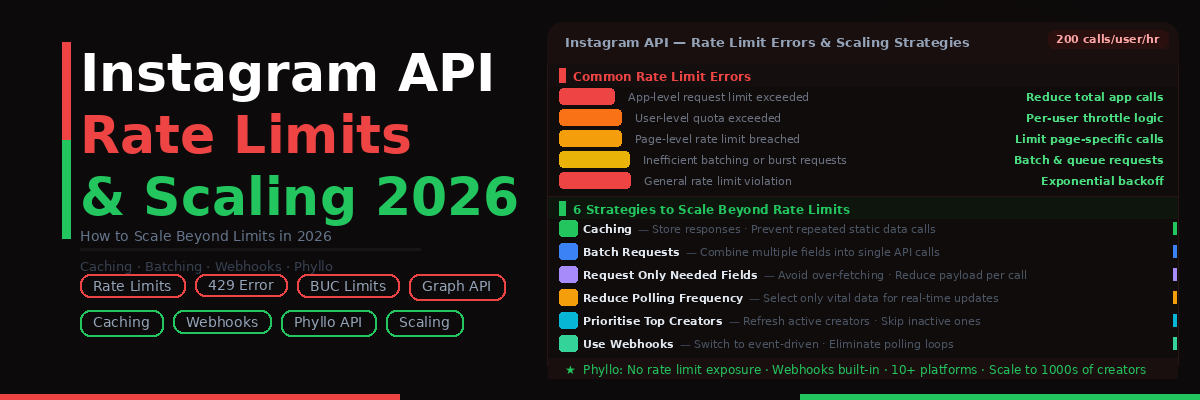


TL;DR Summary: The Instagram API rate limit is 200 calls per user per hour under the Business Use Case model. App-level limits scale with users but can become a bottleneck at scale. In 2026, Meta deprecated the Basic Display API, tightening enforcement on the Graph API ecosystem. To scale beyond these limits, use caching, webhooks, and request batching - or use a unified API layer like Phyllo that abstracts rate limit management entirely.
- Instagram API rate limits cap Business Use Case calls at 200 per user per hour, counted per access token, not per app.
- An app with 100 connected creators gets roughly 20,000 calls per hour, so capacity scales linearly.
- Error codes 4, 17, 32, 613 and the 429 response each flag a different breach: app, user or page quota, or bursting.
- Caching, request batching, slower polling and webhooks are among the 6 optimizations that keep usage under the cap.
- Phyllo handles token refresh, polling and retries internally, so teams scale to thousands of creators without the 200 call ceiling.
What is the Instagram API rate limit in 2026?
The Instagram Graph API enforces a Business Use Case (BUC) limit of 200 API calls per user per hour. At the app level, total capacity scales linearly with your user base - an app serving 100 creators can make up to 20,000 calls per hour in total. Exceeding these limits returns a 429 error or platform-specific error codes (4, 17, 32, 613).
Building anything on the Instagram Graph API for this 2026 is both powerful and restrictive. New and modern rate limits have become one of the major challenges often faced by the developers while designing creator economy tools, analytics dashboards, and influencer platforms.
If you fail to handle the rate limits correctly, you may end up breaking up the product at scale. Our guide will thus explain to you how different Instagram API rate limits’ function, their latest changes, and the efforts to scale them efficiently without any hassle.

What are the Changes with Instagram API Rate Limits in 2026
Strict Business Use Case rate limits are a few major shifts in 2026. Meta Platforms have restructured the way in which they measure API calls by focusing on single user consumption instead of simple app-level limits.
Simultaneously, the Instagram Basic Display API depreciation has forced many developers to rely solely on the entire Graph API ecosystem. Such consolidation will indicate strict enforcement, few loopholes, and high penalties for using APIs inefficiently.
For developers who are new to building on Meta's platform, our complete guide on Instagram Graph API integration covers the full 2026 setup process - OAuth flows, app review, permission scopes, and all six key production challenges - before diving into rate limit optimization.
- High demand of data from creator tools
- More expectations based on real-time analytics
- Increase in scrutiny related to the misuse of APIs
How Instagram API Rate Limits Work

Instagram API Rate Limits mainly work on two main layers as follows:
1. Business Use Case (BUC) Limits
Business Use Case limits are calculated per token or per user. BUC limits follow the below common rule-
200 API calls for a single user in one hour
Accordingly, if an app can manage 100 influencers or content creators, its theoretical limit will become-
200 x 100 = 20,000 calls in one hour
2. Platform Rate Limits
Platform Rate Limits work at the app level and serve as a global cap to avoid any abuse across the users.
Overview of the 429 Error and its Triggers
The 429 Error or Two Many Requests error takes place in either of the following conditions-
- When the allowed calls for a single app or user exceeded the prescribed limit.
- When someone bursts multiple requests too fast.
- When you query insights and other heavy endpoints repeatedly.
Triggers of the 429 Error are:
- Frequent polling of the available data
- Fetching of any unnecessary field
- Caching shortage
Rate Limits Based on the Type of API and the Corresponding Endpoint Costs
Here, you will get a simple breakdown of the frequently used endpoints in the Instagram Graph API:
The 5 Most Common Rate Limit Errors and What Causes Them
Both marketers and developers should understand the 5 most common error codes to debug the problems faster-
Error Code 4
Error Code 4 takes place when users reach the application’s request limit. The error mainly occurs when excessive calls occur at the app level.
Error Code 17
Error Code 17 occurs when the brand or developer reaches the users’ request limit. The triggering factor in this case is exceeding the quota per user.
Error Code 32
Error Code 32 takes place when the marketer or the developer reaches the page request limit. Such an error occurs when you make excessive calls to any particular page.
Error Code 613
In the case of Error Code 613, calls to the API exceed their rate limits. The triggering factor in this case is inefficient batching or bursting of requests.
429 Error
429 Error takes place when you make too many requests to an API. Accordingly, the triggering factor will be violation of the general rate limit.
How to Calculate Your Instagram API Rate Limit Needs Before You Build
Before creating your API system, you must estimate its usage based on the following steps or framework-
Step 1-Determine the Number of Creators
To start, you must determine the total number of creators. For instance, there are 500 creators.
Step 2-Refresh Frequency
Every app or API operates based on the standard refresh frequency as follows:
- Insights after every one hour
- Profile data after every 24 hours
Step 3 - Estimate daily API calls
For each creator, assume:
- Profile data: 2 calls per day (refreshed once every 12 hours)
- Insights data: 5 calls per day (refreshed every -5 hours)
For 500 creators:
- Profile calls: 500 × 2 = 1,000 calls/day
- Insights calls: 500 × 5 = 2,500 calls/day
- Total: 3,500 calls/day
By doing so, you will avoid committing a big mistake of identifying limits post deployment.
6 Strategies to Optimize Your Instagram API Usage and Stay Within Limits
Once you gain knowledge of Instagram API Rate limits and the framework/steps to identify the Instagram API Rate Limit requirements, you must adopt a few smart strategies to optimize your Instagram API use and stay within the fixed limits:
Use Caching/Tracking the Users’ Response
You must store your users’ responses and prevent repeated calls to obtain static data.
Batch Request/Single Request
Make sure to combine different fields into a single request wherever it is possible.
Request Only a Necessary Fields
One should avoid over-fetching irrelevant data. Instead, request for only crucial data associated with your required fields.
Reduction of Polling Frequency
Developers should remember that not every data requires real-time updates. In this situation, one should select only a few vital data for real-time update to reduce the polling frequency.
Top Creators at the Priority
One should regularly refresh the top creators as compared to the inactive ones.
Use of Webhooks
You should switch to event-driven updates from simple polling or use webhooks whenever there is support for it.
For a detailed technical walkthrough of implementing each of these strategies — including webhook integration, back off logic, and third-party tool optimization — see our comprehensive guide on handling Instagram API rate limit errors in production.
When Rate Limits Become a Hard Ceiling/Bottle Necks and How to Overcome
Developers may sometimes hit the API rate limits even when they have optimized everything. In such situations, they must request for quota increases with the help of Meta for Developers.
What Exactly Meta Wants:
Meta for developers often checks the following:
- Clear use case for any business
- Efficient use of an API system
- Zero redundant call
However, approval from ‘Meta for developers’ has no guarantee, as reviewing process may take a few weeks and limits may continue to be restrictive.
Instagram API Rate Limits vs Phyllo-How a Unified API Removes the Ceiling/Bottleneck
Major bottlenecks of the Instagram Graph API while designing creator-focused products are the polling complexity, rate limits, and scaling constraints, along with the data access. Here, you will get a clear comparison of how the native Instagram APIs may stack up against any unified API, like the Phyllo’s API.
Key Benefit of Phyllo
Phyllo's Instagram API abstracts the complexities of the native Instagram Graph API — eliminating direct exposure to rate limits, managing token refresh, and handling Stories polling automatically — so your team can scale to thousands of creators without hitting the 200-calls-per-user ceiling.
Conclusion
Instagram API rate limits are no longer just a technical detail—they’re a core architectural constraint. As platforms scale in 2026, developers must design systems that are efficient, event-driven, and rate-limit aware from day one. If you ignore them, your product will break. If you design around them, you can scale smoothly—even with millions of API calls.
Frequently Asked Questions
1. What is the Instagram API rate limit?
It’s the maximum number of API calls allowed per user or app within a specific time window, typically 200 calls per user per hour.
2. How to fix Instagram API rate limit error?
Reduce request frequency, implement caching, batch calls, and avoid unnecessary data fetching.
3. How many calls can I make to the Instagram API?
Generally, 200 calls per user per hour, but total capacity scales with your user base.
4. Can I increase my Instagram API rate limit?
Yes, through Meta’s developer portal, but approval depends on your use case and efficiency.
5. What is error code 32 in Instagram API?
It indicates a page-level rate limit breach due to excessive requests to a specific resource.
What is the Instagram API rate limit in 2026?
The Instagram Graph API allows 200 calls per user per hour under its Business Use Case limit, so an app with 100 connected creators tops out around 20,000 calls hourly.
Why does the Instagram API return a 429 error?
A 429 means too many requests. It fires when a user or app passes its hourly quota, when calls burst too quickly, or when heavy endpoints like Insights get polled again and again.
How do you fix an Instagram API rate limit error?
Cut request volume first: cache static profile data, batch fields into one call, request only the fields you use, and add exponential backoff with jitter before retrying a 429.
What is error code 32 in the Instagram API?
Error code 32 is a page-level rate limit breach, triggered by too many calls against one page or resource. Spacing those requests out or caching the response clears it.
Can you increase your Instagram API rate limit?
Quota increases are requested through Meta for Developers, but approval is not guaranteed. Meta looks for a clear business use case, efficient calls, and no redundant requests.
How do you estimate Instagram API calls before building?
Multiply creator count by daily refreshes. At 2 profile calls and 5 insights calls per creator each day, 500 creators comes to 3,500 calls a day, well inside the hourly cap.
Which Instagram API endpoints use the most quota?
Insights and Hashtag Search are the heaviest, both rated high cost. Profile and media reads on the Graph API stay low cost, and content publishing writes sit in the middle.
How does Phyllo remove the Instagram API rate limit ceiling?
Phyllo is a unified social data API that wraps the Instagram Graph API, handling token refresh, Stories polling and 429 retries for you across Instagram, YouTube and TikTok.